
Updating or changing your SASSA phone number is easy when we are here. This guide will guide you through the complete process on how to change your phone number in the SASSA system to your existing one.
Having a registered phone number in your SASSA application is a highly important thing to keep receiving grants, as it’s the way SASSA uses to verify an applicant who wants a grant or a beneficiary.
The SASSA policy for applicants is to enter a registered phone number only in your own name, and for continued beneficiaries, it’s also important to keep the registered phone number in the application.
It’s a matter of fact, many people have to change their registered number in SASSA due to various serious reasons like losing the SIM card, phone, or the number of compromised.
If you’re new to SASSA and taking it lightly, let me tell you that to keep receiving the grant, you have to update your number if you’re in a similar situation, or your application will be cancelled.
Just a small information, this is an information change request from you to SASSA, like changing banking detail in which you request a change due to a valid reason.
Can You Really Change Your SASSA Phone Number?
The shortest answer to this is YES, when there’s a problem, there’s a solution, using several ways, either online or offline, beneficiaries are now able to change their number easily.
The most frequently used methods of updating SASSA phone numbers people use are online, which include changing through the official website, through WhatsApp, and in-person visits to the office.
I am going to uncover all the possible methods you can use to change your number, no matter what reason is leading you to change it, you can do it in multiple ways in just a few steps.
But before you start changing it, it’s important to know that changing a number isn’t really a straightforward process; you have to use a proper method that requires some prerequisites.
What You Need Before Changing Your SASSA Phone Number
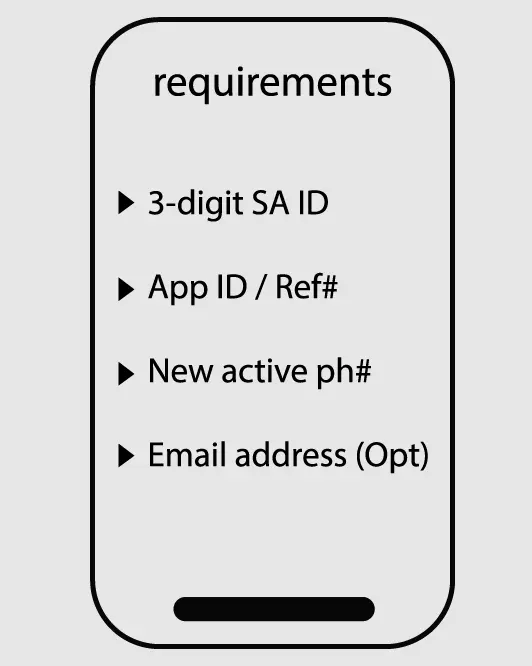
These requirements are the basics you must have before you update your number in no time.
- A valid 3-digit SA ID
- Application ID / Reference Number
- New and active cellphone number (must be registered on your own ID)
- Optional: email address
Important: If you don’t have application ID, i will also tell you how you can change after retrieving your application iD.
Method 1: How to Change Your SASSA Phone Number Online (Step-by-Step Guide)
Step1:
- Visit this dedicated page of the SASSA website for this purpose https://srd.sassa.gov.za/sc19/contact
Step2:
- Find the button named as click here to update/change your number and click/tap on it.
Step3:
- Enter the required details, which include your phone number, 13-digit SA ID number, and 6-digit application ID number.
Step4:
- After some system processing, the SASSA system will allow you to enter your new number to replace in the system with old one.
Step5:
- An OTP will be sent to your new number or the number you entered now. Provide the OTP and let the system verify and confirm the change.
Note: There is no direct method to update the number without the application ID; you must have to retrieve this before you go for the number change.
Method 2: Change Your SASSA Phone Number Without Application ID
To simply know your application ID, you can perform a SASSA Status Check or read this on how you can find application ID easily. After this, repeat the same process as I just told.
- Visit the SC19 contact page from the official SASSA portal.
- Click on the change number button and provide all necessary details (Ph#, App ID, National ID).
- Confirm the change using the OTP sent to your phone, and you’re done.
Method 3: Use WhatsApp to Update SASSA Contact Details
Step1:
- First, save the official WA# of SASSA 0600 123 456 in your phone and refresh WhatsApp chats.
Step2:
- Type any message in the chatbox or say “Hello” and send.
Open
- Select one option (update number) from the options that you’ll receive in an auto-generated reply from SASSA.
Step3:
- Provide all the required details, including your new contact number, and wait for the process to be completed at the end of SASSA. A confirmation message will be sent to you.
You may not be able to do this using a business WhatsApp account, use the individual standard WA chat messenger.
Method 4: SASSA Change Phone Number Without OTP By Office Visit
This is a traditional, old-fashioned method, but it still works if you don’t have any other option to change your number.
- Simply arrange a visit to your nearest SASSA branch.
- Reach the helpdesk manager and ask if you want to change your ph#.
- They will require your ID number and the new phone number to which you want to change.
- After a few minutes, it will be updated in their official system, and you’ll receive an automated confirmation message on your phone.
Important: Before visiting take all your important documents with you, SASSA may require something from these.
Method 5: Request Phone Number Change via SASSA Email or Helpline
Email Method:
- Log in to your email account that you provided in your online SASSA application form.
- Type an email titled “Contact Number Change Request” and write that you want to change your phone number from the old to the new one.
- Also, send other details in the email (ID Number, new phone#, Old phone#, application ID)
- If you receive a reply from SASSA about any other requirements, provide them in the reply to the same email.
Important: If you;re using this method, always counter talk in the reply of same email, otherwise your new email may reach someone else in SASSA which can cause confusions on both sides.
Helpline Method:
- Make a call to this number 0800 601 011 from your new preferable form your new phone number.
- Ask the operator if you’re interested in changing the number.
- Provide all requirements he/she asks for and done.
- Wait for the confirmation message.
Important: If you don’t receive any confirmation either through email or on your phone#, contact SASSA or log into your SASSA account to see whether your number is updated.
How Long Does SASSA Take to Update Your Phone Number?
Average processing time is 14 business days, but it can take longer in some cases. Don’t panic in this situation; rather, call the helpline.
What to expect after submission?
After submitting the change request, the most important thing is the confirmation message; this message is a clear indication that your number has been successfully changed.
How to confirm it’s been updated?
The smartest way to confirm a change is by simply logging into your SASSA account and seeing what number appears there. If the new number isn’t appearing, wait or contact SASSA.
Important: To avoid unwanted payment delays, process change immediately after receiving your current month payment or visit SASSA office for quick changes.
How to Report Fraud or Unauthorized Phone Number Changes
In rare cases, if you notice your number has been changed without your permission, reporting via https://srd.sassa.gov.za/sc19/auth can be helpful.
SASSA system is safe enough now that it has the ability to keep the information secure and safe for beneficiaries.
But still, filing a police report and calling the helpline will always put you on the safer side.
Take this on a serious note, if you failed to report anything like this, your account may become on hold and can cause unecessary problems for you indirectly.
Reasons You Might Need to Change Your SASSA Phone Number
- Lost or stolen phone
- Switched networks
- SIM is damaged or inactive
- Initially, I used the wrong number
- Preventing grant fraud
Tips to Avoid Phone Number Issues with SASSA in the Future
- Keep your number active and registered only in your name.
- Avoid giving someone else’s number instead of yours.
- Don’t share OTPs or grant details with anyone.
- Use email as a backup contact if possible.
FAQs
Can I change my number without visiting an office?
Yes, the most convenient way is changing online; in fact, the processes I’ve discussed are mainly online-focused.
Can I use someone else’s number?
No, it may be accepted at first, but later you’ll face problems; try avoiding this.
Will my payments be delayed?
If processing completes before the arrival of the monthly payment dates, then not; if pay dates arrive, then the payment will be scheduled for next month.
Can I change my phone number multiple times?
Yes, but this is not recommended to keep yourself safe from potential problems.
Can I use another country’s phone number?
No, it’s not allowed to use any number other than South Africa; if you try to do this, this can put your SASSA account at risk.